
You may see a warning in your Bitrix24 Control Panel:
What this means
All PHP 7 versions have reached end of life and are no longer supported. They no longer receive bug fixes or security updates. Do not use PHP versions earlier than 8.1.
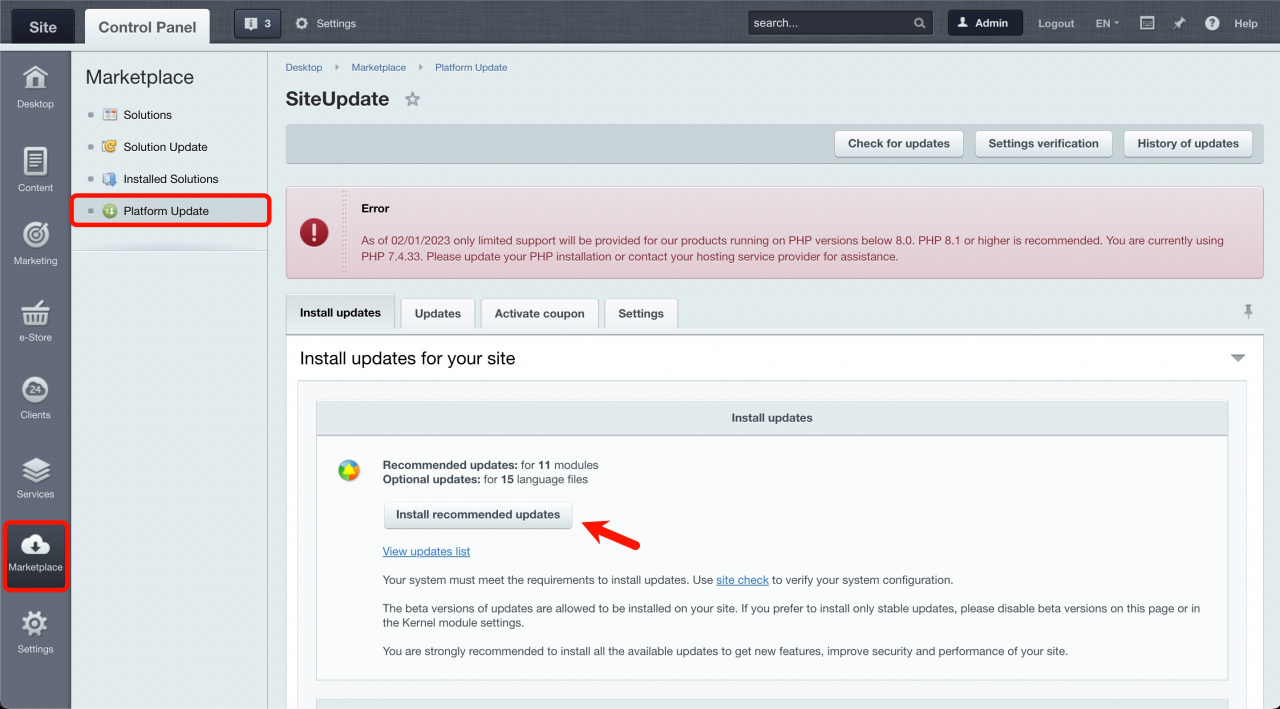
If you stay on an older version, you won’t be able to install Bitrix24 updates. This means you’ll miss new features, as well as important security and performance improvements. To continue updating your system, upgrade PHP to version 8.1 or later.
What to do
Upgrade your PHP version to 8.1 as soon as possible.
The process may take several steps. If needed, contact your system administrator or hosting provider.
- Back up your site
Use the built-in backup tool or create a server-level backup. - Install platform updates
Go to Control panel > Marketplace > Platform Update. - Update third-party solutions
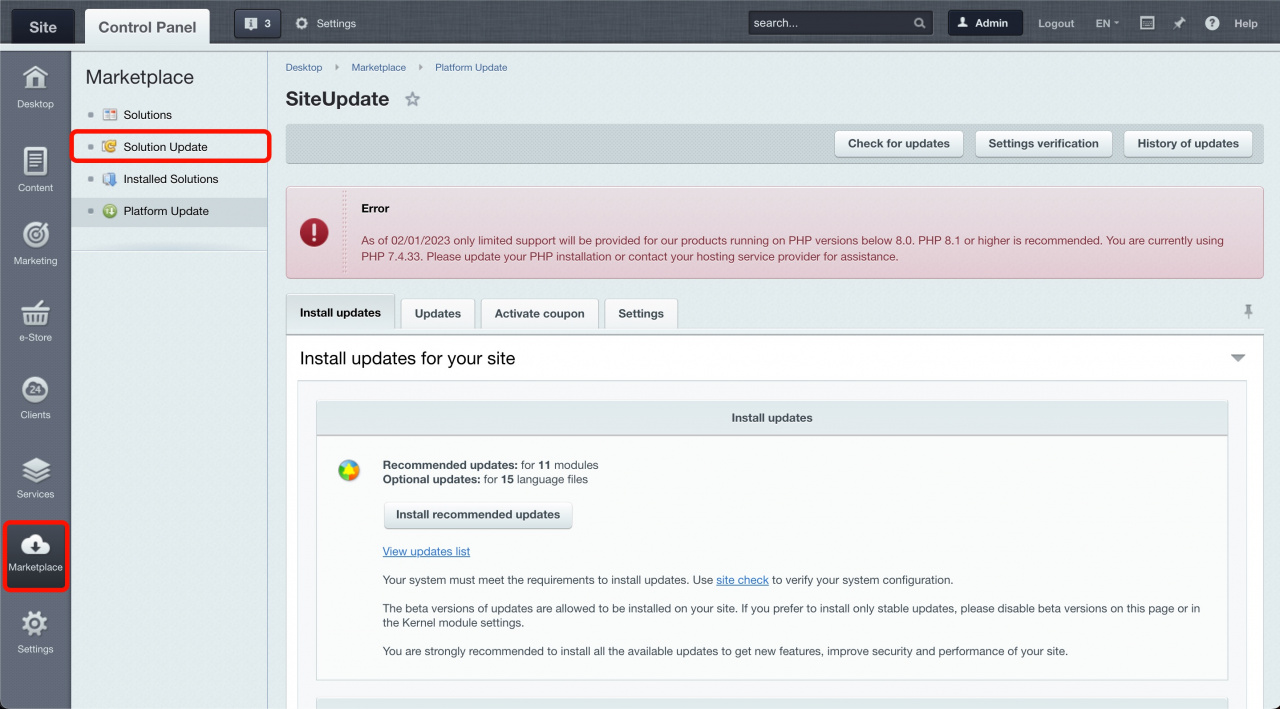
Go to Control panel > Marketplace > Solution Update. - Upgrade PHP to version 8.1
If you use BitrixVM, open the menu and select: 1. Manage servers in the pool - 8. Update PHP and MySQL. Learn more in this course.
- Check for updates again
Install any remaining platform or solution updates.
Fix errors after upgrading PHP
- If standard Bitrix24 modules don’t work, contact Bitrix24 Support.
- If the solution name starts with
bitrix.*(for example,bitrix.eshop,bitrix.sitecommunity,bitrix.sitecorporate,bitrix.siteinfoportal,bitrix.sitepersonal,bitrix.learningtemplates), contact Bitrix24 Support. - If a third-party module from the Marketplace doesn’t work, contact the module developer. You can find their contact details in the Support tab.
Common issues and how to fix them
Why issues happen
After upgrading to PHP 8.1, issues usually occur if:
- You didn’t install platform updates before the upgrade.
- You didn’t update third-party solutions.
- A module doesn’t support PHP 8.1.
How to fix common issues
- Downgrade to the previous PHP version 7.x, get all the recommended updates, and then upgrade to PHP 8.1x again.
- If installing updates does not help to fix the issues, follow the recommendations from this section - What to do in case of errors when updating the PHP version.
- Temporarily disable the module that contains errors by moving it away from
/bitrix/modules. - Remove a third-party solution that contains errors.
These steps address specific module issues. Each case may require a separate fix.
[Ux11] Error in the "#MODULE#" module description. Cannot connect the update server. [Ux11] Error in the "#MODULE#" module description.
Cannot connect to the update server after upgrading to PHP 8.1. The site works, but updates fail.
Solution:
Open the file: /bitrix/modules/<. Replace:
module_name>/install/index.php
function ()with:
function __construct()
The script encountered an error and will be aborted. To view extended error messages, enable this feature in .settings.php
Solution:
Connect to FTP/SFTP or log in to the hosting control panel, and enable the error output in /bitrix/.settings.php:
'debug' => true,
After that, you will see the error message text on the site.
Example of the error message text
Non-static method Super\Functions\CSuperModRep::checkBack() cannot be called statically (0) /home/bitrix/modules/super.mod/lib/functions/CSuperModRep.php:52 #0: Super\Functions\CSuperModRep::checkRepActive() /home/bitrix/modules/super.mod/classes/general/CModEvents.php:1621 #1: CModEvents::OnPageStartHandler() /home/bitrix/modules/main/classes/general/module.php:480 #2: ExecuteModuleEventEx(array) /home/bitrix/modules/main/include.php:163 #3: require_once(string) /home/bitrix/modules/main/include/prolog_before.php:14 #4: require_once(string) /home/bitrix/modules/main/include/prolog.php:10 #5: require_once(string) /home/bitrix/header.php:1 #6: require(string) /home/index.php:1
In this example, the third-party method CSuperModRep::checkBack() of the super.mod. solution gives the error.
To fix the error, in the checkBack() code, you need to declare the static function.
Replace
function checkBack()
by
public static function checkBack()
PHP Fatal error: $GLOBALS can only be modified using the $GLOBALS[$name] = $value syntax in /www/bitrix/modules/main/tools.php
This error may appear after upgrading to PHP 8.1x if you have not installed the available platform updates when using the PHP 7.x version.
Solution:
This issue has been fixed in the Main module updates main 22.100.0.
Downgrade to the previous PHP version 7.x, get all the recommended updates, and then upgrade to PHP 8.x again.
[TypeError] call_user_func_array(): Argument #1 ($callback) must be a valid callback, non-static method COMP\BXE\EventHandlers::AdminContextMenuShow() cannot be called statically (0)...
This error may appear after upgrading to PHP 8.1x, but it is not obvious:
Example of the error message text
[TypeError] call_user_func_array(): Argument #1 ($callback) must be a valid callback, non-static method COMP\BXE\EventHandlers::AdminContextMenuShow() cannot be called statically (0) /var/www//bitrix/modules/main/classes/general/module.php:480 #0: ExecuteModuleEventEx /var/www/bitrix/modules/main/interface/admin_ui_list.php:1983 #1: CAdminUiContextMenu->Show /var/www/bitrix/modules/main/interface/admin_ui_list.php:1168 #2: CAdminUiList->ShowContext /var/www/bitrix/modules/main/interface/admin_ui_list.php:630 #3: CAdminUiList->DisplayFilter /var/www/bitrix/modules/iblock/admin/iblock_element_admin.php:5217 #4: include(string) /var/www/bitrix/admin/cat_product_admin.php:3
The error message text does not show the module directory, but this method COMP\BXE\EventHandlers::AdminContextMenuShow() belongs to the third-party module.
Solution:
To fix the error, in the AdminContextMenuShow() code, you need to declare the static function correctly.
Replace
function AdminContextMenuShow()
by
public static function AdminContextMenuShow()
A blank white screen after upgrading to PHP 8.1x
This error may appear because of setting the short_open_tag = Off parameter in PHP settings.
Solution:
-
Set this value in the PHP configuration file:
short_open_tag = On. -
Check the web server logs for any possible errors and fix them.
-
Also, you can check the errors on the page with a blank white screen: right-click the page and select View Page Source, scroll down, and check if there are any errors.