
Alaio Vibecode works with your Bitrix24 data, including deals, customers, documents, and messages. It uses several security layers to protect that data.
- Servers are not exposed to the public internet
- Authentication works only through Bitrix24
- Different access keys are used for different tasks
- You can revoke access at any time
In this article:
How Alaio Vibecode protects data
Servers are not exposed to the public internet. Apps run on BlackHole servers. These are private servers with no public IP address. They do not accept incoming connections from the internet.
This helps prevent risks such as:
- Brute-force attacks
- Attempts to connect to admin ports
- Key exposure on public pages
Authentication through Bitrix24. To access Alaio Vibecode and its apps, users must sign in with a Bitrix24 account.
In practice, this means:
- There are no separate usernames or passwords for Alaio Vibecode. Employees do not need to manage extra credentials.
- If an employee leaves the company, a Bitrix24 administrator can remove their access, which also blocks access to Vibecode.
- If two-factor authentication is enabled in Bitrix24, it also applies to Vibecode.
- App permissions follow Bitrix24 permissions, so employees can only see the data they already have access to.
Separate access keys for different tasks. Apps need access keys to work with Bitrix24 data. Vibecode uses different key types for different tasks. If one key is compromised, the others keep working. Each key has only the permissions it needs.
Main key types:
- Personal automation key: works only inside your Bitrix24
- App key: issued when you share an app with coworkers or another Bitrix24 account
- Platform service key: hidden from the user and used by Vibecode to manage apps.
Revoke keys and remove access at any time. You can revoke a key, remove an employee's access, or delete an app at any time. This is useful if:
- A key was exposed in a public place or message
- An employee left the company or changed roles
- You no longer need an app and want to free up resources.
After you revoke a key, it stops working right away. Apps that use that key stay unavailable until you create and add a new one.
Data stays in Bitrix24. Customer data, deals, and messages stay in your Bitrix24. An app accesses this data through a secure channel and does not copy it. Only the data needed for a specific app is sent to BlackHole servers, and it is not stored longer than needed to generate a response.
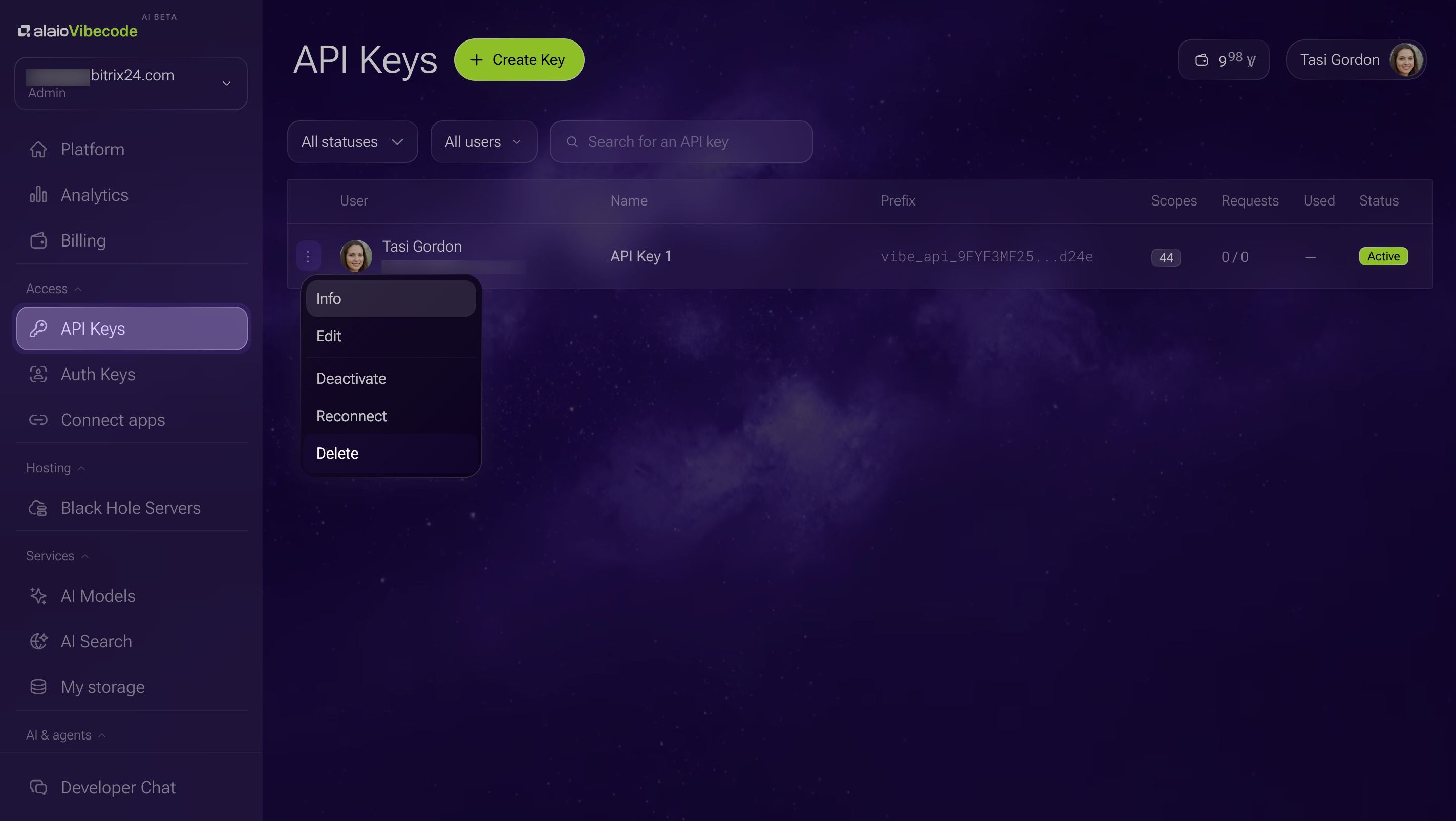
What to do if a key is compromised
If you think someone got access to a key, delete it right away.
1. Open the API keys section.
2. Click the Three dots (...) next to the key you want to revoke.
3. Select Delete. You cannot restore a deleted key.
Then create a new key and update it in every app where the old key was used.
In brief
- Alaio Vibecode works with your Bitrix24 data, including deals, customers, documents, and messages. It uses several security layers at the same time.
- Apps run on BlackHole servers. These are private servers with no public IP address and no incoming internet access.
- Access to Alaio Vibecode and its apps requires a Bitrix24 account.
- Apps need access keys to work with Bitrix24 data. Vibecode uses different key types for different tasks. If one key is compromised, the others keep working.
- Customer data, deals, and messages stay in your Bitrix24. Apps access this data through a secure channel and do not copy it.
- If you think a key has been compromised, delete it in the API keys section.