
An access key is a string that Bitrix24 uses to identify your app. Without a key, an app cannot read deals, create tasks, or send messages. If you revoke a key, the app loses access to data right away.
In this article:
Key types in Vibecode
Vibecode has three key types. Each one serves a different purpose.
API key (vibe_api_). Use this key when you build an app only for yourself, such as a personal dashboard, script, server integration, or bot in your own account. This key is linked to one Bitrix24 account, and all requests run on your behalf. You can find it in the API Keys section.
Authentication key (vibe_app_). Use this key for apps that you share with coworkers or use across multiple accounts. Each user must authorize the app. Requests then run on that user's behalf, with that user's permissions and limits. This key works well for catalog apps that run in different accounts under different users.
Management key (vibe_live_). Use this key to manage the platform: manage keys, view accounts, and process feedback. It is not linked to a single account. It does not give access to Bitrix24 data like deals, tasks, or other items. Create it in the Management Keys section.
Using separate key types helps limit risk if a key is exposed:
- If a personal automation key appears in a public repository, only your personal apps are at risk. Team apps stay safe.
- If an app key is exposed, you can revoke only that key and issue a new one without affecting other apps.
- A platform service key is not available externally. No one can copy it from a chat or source code.
How keys work with shared access
When you share an app with a coworker, a department, or another Bitrix24 account, Vibecode does not pass your key to that person. The platform creates a separate key for each recipient. This means:
- The recipient can see only what the app settings allow. They cannot access your data.
- If the recipient removes the app, only their key is revoked. Your key keeps working.
- If you need to remove access for one recipient, revoke only that key. All other keys stay active.
Manage keys
Open the API Keys section from the Vibecode sidebar menu. This section shows all keys linked to your app, including your key and the keys for people you shared the app with.
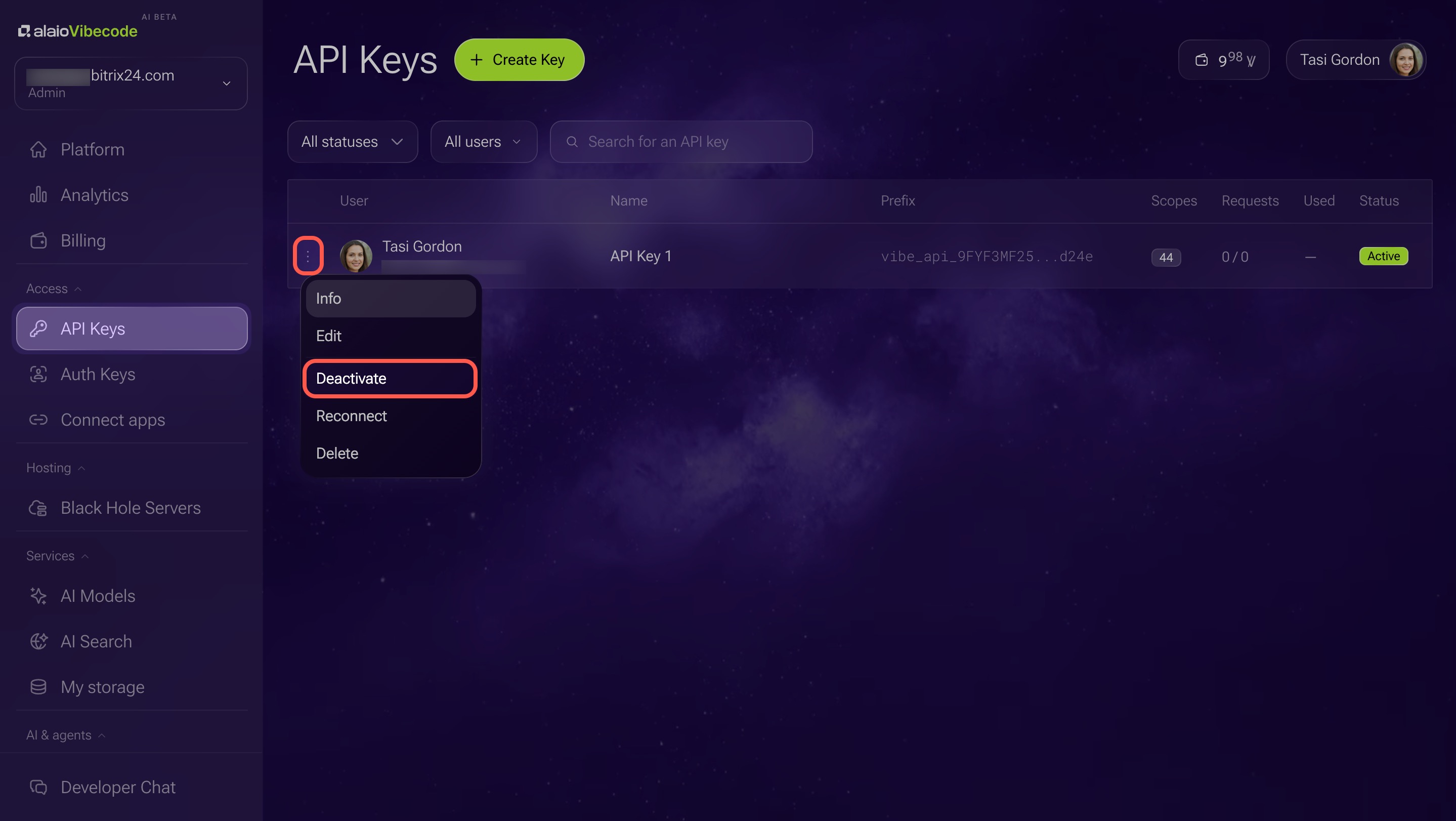
Each key includes details such as who received it, when it was created, when it was last used, and what permissions it has. Use this information to see which keys are active and which ones you can revoke.
Revoke a key if:
- An employee with access has left the company
- The key appeared in a chat, screenshot, or public code
- You no longer need the app
- You want to rotate the key on a schedule, for example once a year.
In brief
- A key is a string that Bitrix24 uses to identify your app.
- Vibecode has three key types: an API key for personal automations, an authentication key for shared apps, and a management key for platform administration.
- Separate key types help make sure that if one key is exposed, everything else keeps working.
- With shared access, each user gets their own key. The author's key is never shared.
- You can view all keys in the API Keys section in the Vibecode sidebar menu.