
When a task involves several people, you can keep everyone in one place. This helps you split work by stage or across different teams. Some people complete parts of the task. Others follow progress and step in when needed.
For example, a company is preparing a website post. A marketing specialist creates a task to prepare the content. A copywriter creates the text, an editor reviews it, and a manager tracks progress and helps when needed.
Bitrix24 Tasks supports two collaboration roles: Participants and Observers. These roles show who works on the task and who monitors it. Participants help complete the task. Observers follow the process and join only when needed.
In this article, you will learn how to organize collaboration in a task and what Participants and Observers are responsible for.
Collaboration in a task
To organize teamwork in a task:
- Add people and assign roles: who completes the task, who helps, and who monitors progress and results
- Describe the task and keep all key details in one place so everyone has the same context
- Split work between participants with task checklists and assign responsibilities
- Track progress to see what stage the task is in
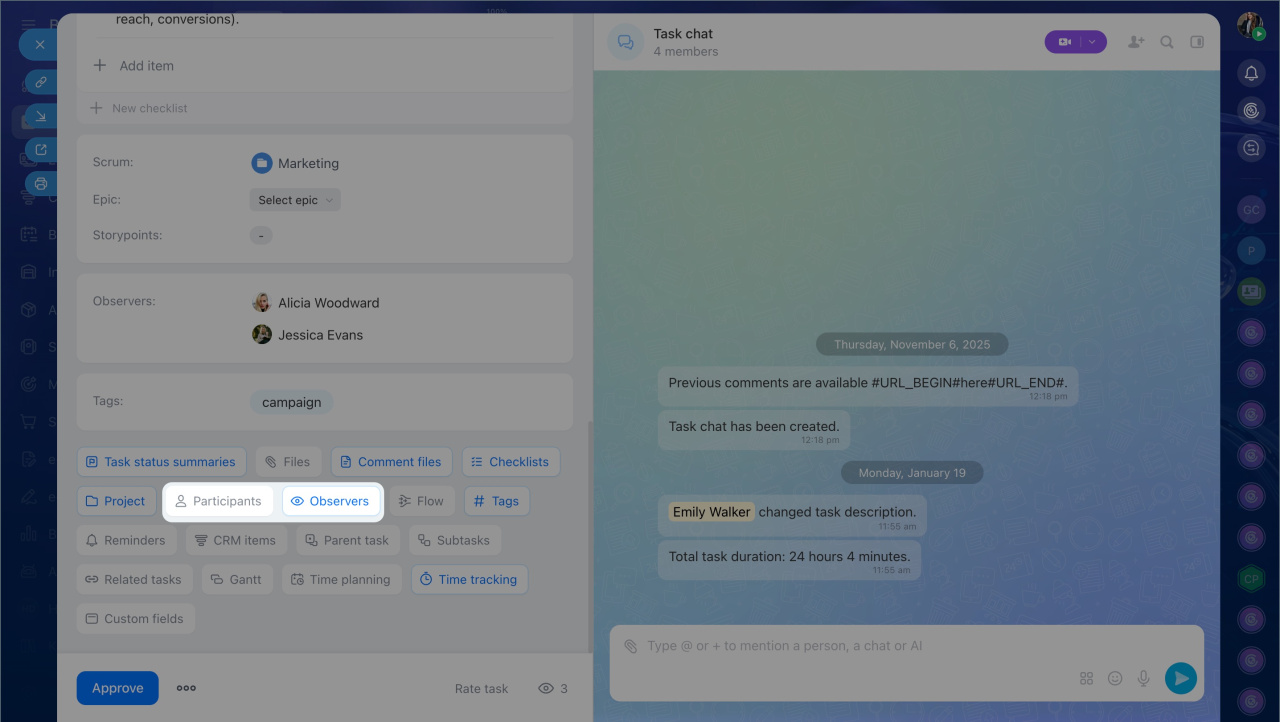
You can add participants and observers when you create a task or later.
Participants help complete the task
Participants are employees who help the assignee work on a task. You can add several participants, and each person is responsible for their own part of the work. The assignee is still responsible for the final result. This makes it easier to divide work across a team.
Prepare a client presentation. A sales team lead creates a task to prepare a presentation. The assignee is the project manager. To handle the slide design, the manager adds a designer as a participant. The manager prepares the content, and the designer formats the presentation.
Write a website article. A manager assigns a copywriter to write an article about the company's new services. An editor is added as a participant to review the text. After that, the copywriter publishes the content.
Launch an ad campaign. A marketer gets a task to launch an ad campaign. They add a targeting specialist as a participant. The marketer prepares the strategy and ad copy, while the specialist sets up the ads.
In all of these cases, employees work in one task, each person has their own responsibilities, and the assignee is accountable for the final result.
Observers monitor the task
Observers are employees who do not work on the task directly but monitor its progress and results. You can involve them when needed. This helps people stay informed and join the task without extra explanation.
Add observers when:
- Colleagues need to follow the task and stay up to date on the details
- Another employee needs the result for the next stage of work
- A manager needs to track deadlines and progress
Create a banner for an ad campaign. A designer is working on a banner task. The marketing manager is added as an observer to track progress, deadlines, and status. This is useful when the manager needs the result for the next step, such as launching the campaign.
Launch a promo code campaign. A Helpdesk specialist is added as an observer. They do not help prepare the campaign, but they need to see the terms and the discussion. While the marketer prepares the campaign details and website copy, the Helpdesk specialist gets the context they need. Later, they can answer customer questions without asking coworkers for details, even after the task is closed.
Prepare an estimate. A manager prepares an estimate for a major client with a 25% discount and adds the CFO and chief accountant as observers. This lets them review the terms in advance and quickly join the discussion about financial details without separate follow-up.
Participants vs. Observers
The main difference between these roles is how a person is involved in the task:
- A Participant completes part of the task
- An Observer follows progress and results
What Participants can do. Participants work on the task together with the assignee and can:
- Discuss task details in the chat
- Receive notifications about all task changes
- Share files
- Add observers
- Change statuses
- Add intermediate and final results
- Set reminders
- Create and attach subtasks
- Turn on time tracking
- And more
What Observers can do. Observers do not complete the task, but they can follow progress, discussion, and results. For example, they can:
- Add other observers
- Discuss task details in the chat
- Attach files
- Set reminders
- Receive notifications about task status changes
Some task actions depend on access permission settings. For example, checklist editing may be limited.
In brief
- You can bring several employees into one task to split work and track progress.
- Tasks include two collaboration roles: Participants and Observers.
- Participants help the assignee complete the task and are responsible for their part of the work.
- Observers do not work on the task directly, but they monitor progress and results.
- Available actions depend on a person's role in the task and access permission settings.
