Booking is not just a convenient tool for scheduling appointments. It helps optimize company resources and efficiently organize customer interactions at every stage of the deal lifecycle.
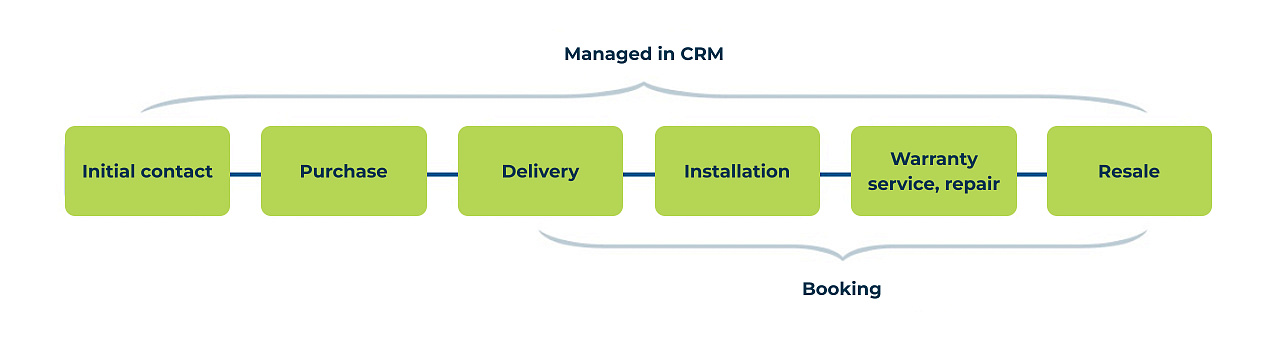
Let's consider an example of a furniture manufacturing company. Here, the sales process begins with selecting materials and design, followed by production, delivery, installation, and warranty service.
Booking is useful from the first contact to post-sales service:
-
Initial consultation: Customers can schedule a meeting with a designer in advance.
Example setup: Create a resource (specialist) and a CRM form for booking. -
Room measurement: Schedule a time for a specialist to visit the site.
Example setup: Create multiple resources, such as a measurement specialist and a company's vehicle. -
Delivery: Choose a date and time for delivery.
Example setup: Create resources for a team of movers and transportation. -
Assembly and installation: Reserve a time for specialists to visit.
Example setup: Create resources for the team and transportation. -
Warranty service and repairs: If issues or defects arise, customers can book a time for a specialist visit.
Example setup: Create a single resource (specialist) and a CRM form for booking. -
Additional sales: Customers can schedule installations for additional modules, accessories, or replacement of consumables.
Example setup: Create a single resource (specialist) and a CRM form for booking.
Examples from other industries
-
Equipment sales
- Commissioning: Booking allows customers to select a convenient time for specialists to set up and launch equipment.
- Regular maintenance: Customers can plan visits for preventive and technical maintenance in advance.
- Repairs and troubleshooting: Booking helps customers quickly schedule repairs and choose a convenient time for a technician visit.
-
Installation and servicing of climate control systems (air conditioners, split systems)
- Measurement and installation: Customers can book a convenient time for a specialist to visit the site.
- Technical maintenance: Booking allows customers to plan cleaning and diagnostics visits in advance.
-
Office equipment (printers, MFPs, copiers)
- Installation and setup: Booking helps coordinate a specialist’s visit for equipment connection and configuration.
- Maintenance and repairs: Customers can schedule preventive maintenance or repairs in advance, avoiding downtime.