
Datasets contain information about warehouses, Inventory management documents, products, deals, and other Bitrix24 elements. Each element has several datasets that automatically include data from system and custom fields. Datasets can be used to create charts and analyze business metrics.
This article explains datasets for analyzing Inventory management and warehouse operations. It also shows how to merge datasets and create charts.
Datasets:
- catalog_store — list of warehouses
- catalog_store_product — product Inventory in warehouses
- catalog_store_document — Inventory documents
- catalog_store_document_item — list of products in Inventory documents
- sale_document_saleorder — sales orders
- sale_document_saleorder_item — sales order details
Examples:
Select a dataset
To analyze information in a report, select a dataset and create a chart.
catalog_store — list of warehouses. This dataset contains data about warehouses used in Inventory management. It includes warehouse names, activity status, and creation dates. The data helps analyze product movement and documents by specific warehouses and filter inactive warehouses in reports.
catalog_store
| Field | Description | Data type |
|---|---|---|
| ID | Warehouse ID | Number |
| TITLE | Warehouse name | String |
| ACTIVE | Warehouse activity status: Y — yes, N — no | String |
| DATE_CREATE | Warehouse creation date | Date |
catalog_store_product — product inventory in warehouses. This dataset contains data about product inventory in each warehouse. It includes the total quantity of products and the reserved quantity for orders. The data helps analyze product availability, assess available inventory, and account for reserves when planning sales and supplies.
catalog_store_product
| Field | Description | Data type |
|---|---|---|
| ID | Inventory record ID | Number |
| PRODUCT_ID | Product ID | Number |
| STORE_ID | Warehouse ID | Number |
| AMOUNT | Total product quantity in the warehouse | Number |
| QUANTITY_RESERVED | Reserved product quantity in the warehouse | Number |
catalog_store_document — inventory documents. This dataset contains data about Inventory documents that record product movement. It includes document types and statuses, creation dates, and responsible employees. The data helps analyze warehouse operations and track completed and canceled documents.
catalog_store_document
| Field | Description | Data type |
|---|---|---|
| ID | Inventory document ID | Number |
| TITLE | Inventory document name | String |
| DOC_TYPE | Inventory document type | String |
| DOC_TYPE_CODE | Inventory document type code | String |
| DATE_CREATE | Inventory document creation date | Date |
| DATE_MODIFY | Inventory document modification date | Date |
| STATUS | Inventory document status | String |
| STATUS_CODE | Inventory document completion status: Y — completed, N — draft | String |
| TOTAL | Total product cost in the inventory document | Number |
| CURRENCY | Inventory document currency | String |
| RESPONSIBLE_ID | Responsible employee ID | Number |
| RESPONSIBLE_NAME | Responsible employee name | String |
| RESPONSIBLE | Responsible employee ID and name | String |
| WAS_CANCELLED | Inventory document cancellation status: Y — yes, N — no | String |
catalog_store_document_item — list of products in Inventory documents. This dataset contains data about products in Inventory documents. It records which products are included in documents, their quantities, and the warehouses they are moved from and to. The data is used to analyze product movement, prices, and operations for specific items in Inventory documents.
catalog_store_document_item
| Field | Description | Data type |
|---|---|---|
| ID | Inventory document item ID | Number |
| DOCUMENT_ID | Inventory document ID | Number |
| DOCUMENT_DATE_CREATE | Inventory document creation date | Date |
| PRODUCT_ID | Product ID | Number |
| STORE_FROM | Warehouse ID from which the product is moved. Used in sales orders, write-offs, and transfers | Number |
| STORE_TO | Warehouse ID to which the product is moved. Used in stock receipts, stock adjustments, and transfers | Number |
| AMOUNT | Product quantity | Number |
| PURCHASING_PRICE | Product purchasing price | Number |
| PRICE | Product selling price | Number |
sale_document_saleorder — sales orders. This dataset contains data about sales orders. It records the creation and modification of orders, delivery parameters, and shipment details. The data is used to analyze shipments and the performance of responsible employees.
sale_document_saleorder
| Field | Description | Data type |
|---|---|---|
| ID | Sales order ID | Number |
| DATE_CREATE | Sales order creation date | Date |
| DATE_UPDATE | Sales order last modification date | Date |
| PRICE_DELIVERY | Delivery cost in the sales order | Number |
| DEDUCTED | Shipment status: Y — yes, N — no | String |
| DATE_DEDUCTED | Shipment date | Date |
| DELIVERY_NAME | Delivery service name | String |
| WAS_CANCELLED | Sales order cancellation status: Y — yes, N — no | String |
| CURRENCY | Sales order currency | String |
| RESPONSIBLE_ID | Responsible employee ID | Number |
| RESPONSIBLE_NAME | Responsible employee name | String |
| RESPONSIBLE | Responsible employee ID and name | String |
sale_document_saleorder_item — sales order details. This dataset contains data about products in sales orders. It includes product details, quantities, prices, and the warehouse from which the shipment is made. The data is used to analyze sales by product and warehouse.
sale_document_saleorder_item
| Field | Description | Data type |
|---|---|---|
| ID | Sales order item ID | Number |
| DOCUMENT_ID | Sales order ID | Number |
| DOCUMENT_DATE_CREATE | Sales order creation date | Date |
| PRODUCT_ID | Product ID | Number |
| NAME | Product name | String |
| PRICE | Product selling price | Number |
| PRICE_CURRENCY | Currency of the selling price | String |
| DATE_INSERT | Date the item was added to the sales order | Date |
| STORE_ID | Warehouse ID | Number |
| AMOUNT | Product quantity | Number |
| COST_PRICE | Product cost price | Number |
| COST_CURRENCY | Currency of the cost price | String |
Create a chart
You can use dataset information to analyze Inventory management in your company. Charts help track product movement between warehouses, document operations, and identify potential discrepancies in records.
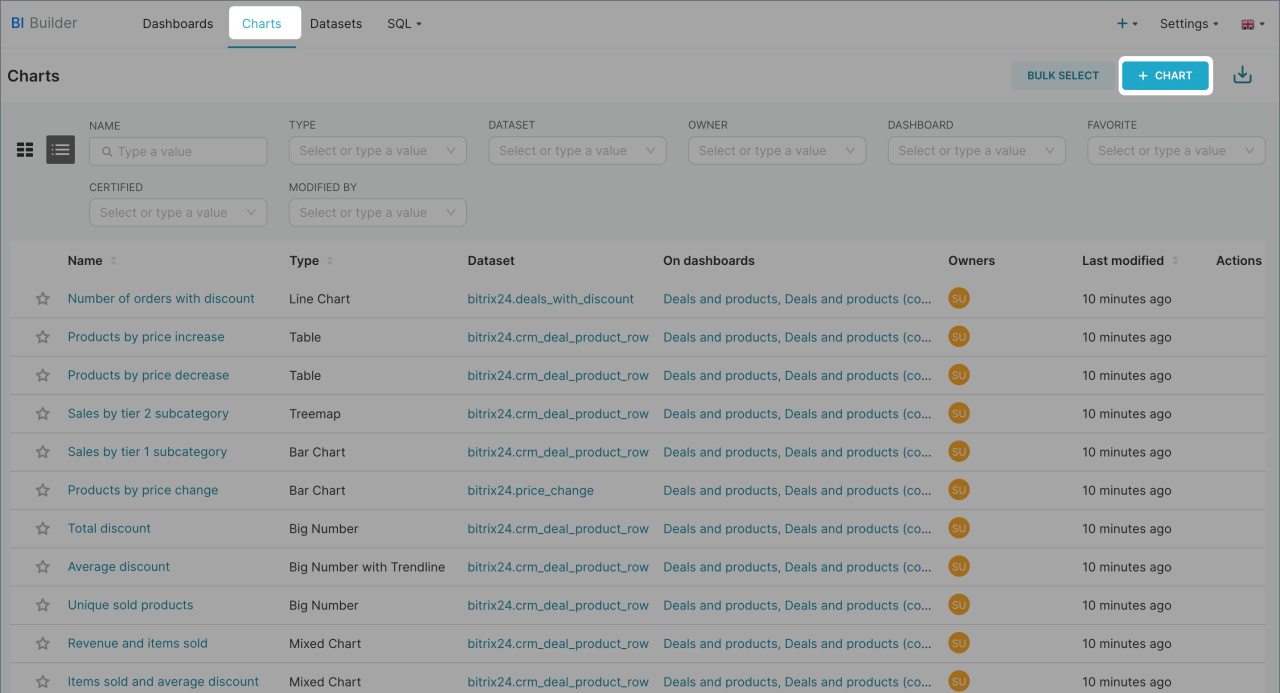
- 1. Open BI Builder > Charts > + Chart.
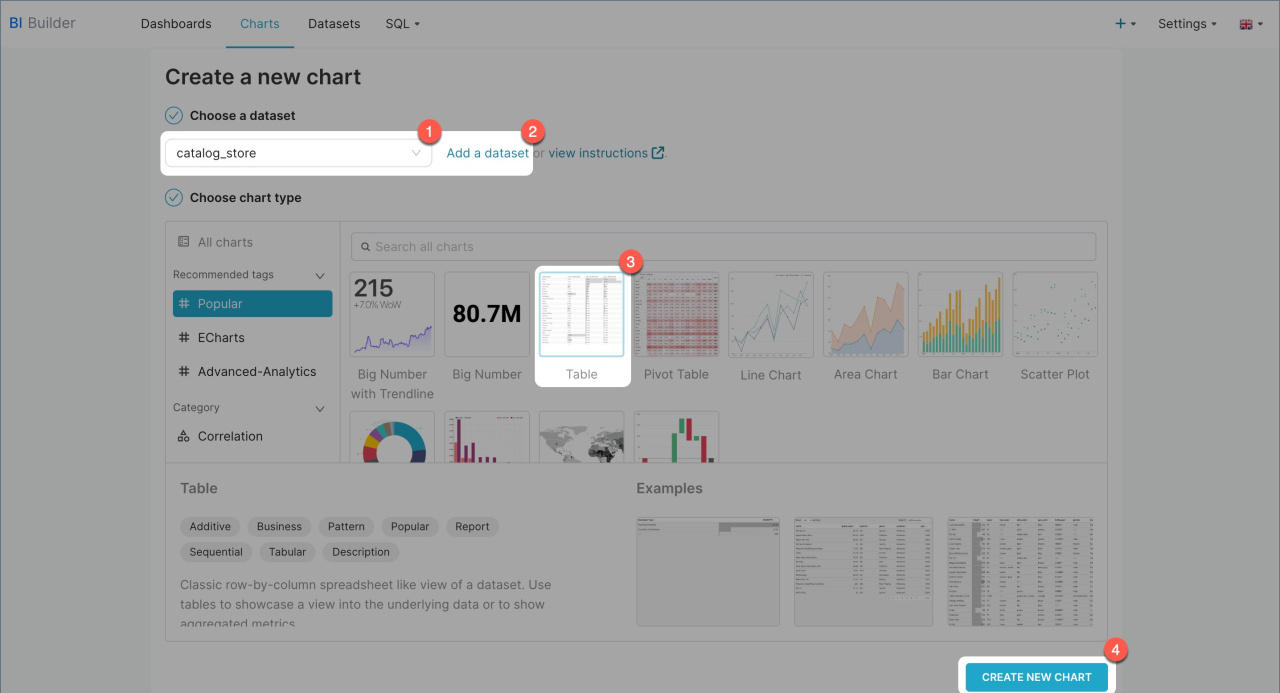
- 2. Select a dataset and the format you want to display the information in: card, table, line chart, or another option. If the required dataset is not listed, click Add dataset and create a dataset.
Create dashboards in BI Builder - 3. Click Create new chart.
Merge datasets
Merge data about sales order details and warehouses to analyze product sales by warehouse.
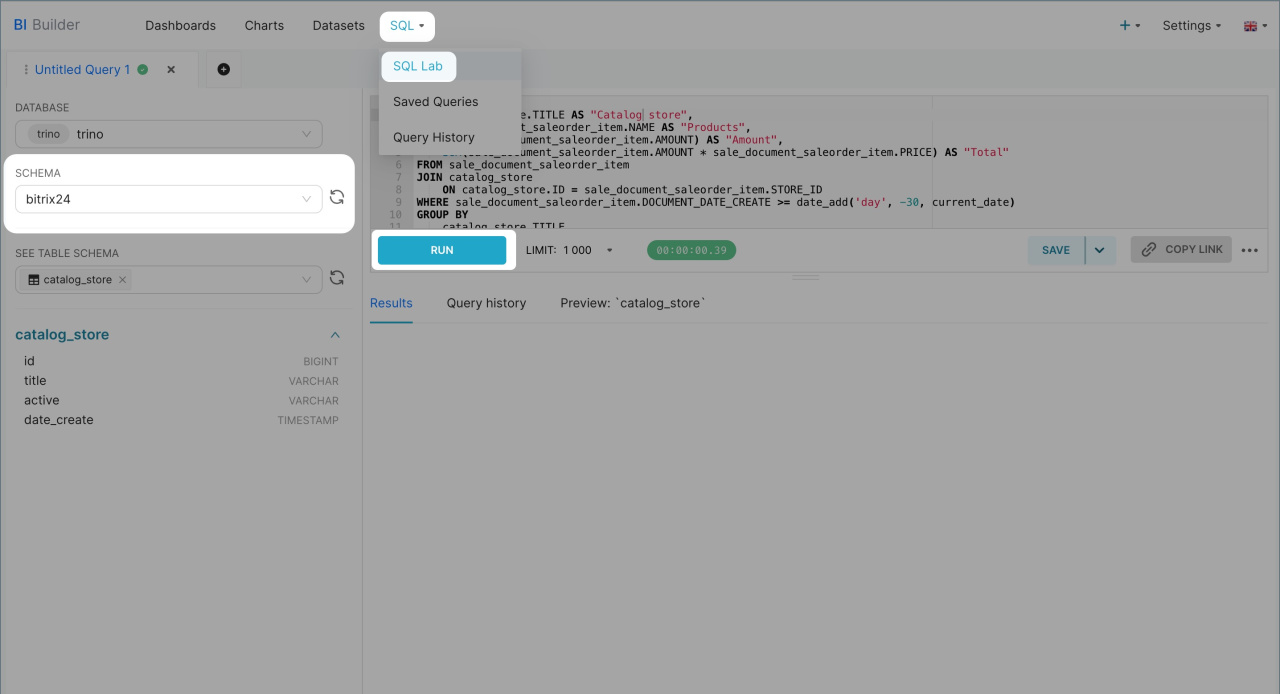
- Open BI Builder and go to SQL > SQL Lab.
- Select the bitrix24 schema.
- Enter an SQL query and click Run. The new dataset will include information from the fields specified in the SQL query. You can save it as a dataset to create a chart for the report.
Create a chart based on a virtual dataset
If you are merging datasets for the first time, check out an example query.
Example SQL query
We wrote an SQL query to extract data from two datasets: sales order details (sale_document_saleorder_item) and the list of warehouses (catalog_store). The query shows which warehouse sold the products, which products were sold, their quantities, and the total sales amount.
You can copy the query and see how product sales are distributed across warehouses for a selected period.
SELECT catalog_store.TITLE AS "Warehouse", sale_document_saleorder_item.NAME AS "Product", SUM(sale_document_saleorder_item.AMOUNT) AS "Amount", SUM(sale_document_saleorder_item.AMOUNT * sale_document_saleorder_item.PRICE) AS "Total" FROM sale_document_saleorder_item JOIN catalog_store ON catalog_store.ID = sale_document_saleorder_item.STORE_ID WHERE sale_document_saleorder_item.DOCUMENT_DATE_CREATE >= date_add('day', -30, current_date) GROUP BY catalog_store.TITLE, sale_document_saleorder_item.NAME ORDER BY SUM(sale_document_saleorder_item.AMOUNT * sale_document_saleorder_item.PRICE) DESC;
SELECT — specifies the information to extract from the dataset. For example, the query SELECT catalog_store.TITLE AS "Warehouse":
- Selects the warehouse name
TITLEfrom thecatalog_storedataset, - Assigns the column the name
Warehouse, - Displays the result in a separate column in the table.
FROM — specifies the main dataset to extract data from. We extract from sale_document_saleorder_item, which contains products, their quantities, and prices in sales orders.
JOIN — connects the sale_document_saleorder_item table with the list of warehouses catalog_store. The query links products in sales orders with information about the warehouses from which they were shipped.
WHERE — filters data by the creation date of items in sales orders and shows data for the last 30 days.
GROUP BY — groups data by warehouse and product to calculate the total quantity and sales amount for each group.
ORDER BY — sorts the result by sales amount in descending order. This displays the products and warehouses with the highest revenue for the selected period at the top of the table.
In brief
- Datasets contain information about warehouses, Inventory documents, products, deals, and other Bitrix24 elements.
- Each element has several datasets that automatically include data from system and custom fields.
- There are six datasets for analyzing Inventory management: list of warehouses (catalog_store), product Inventory in warehouses (catalog_store_product), Inventory documents (catalog_store_document), products in Inventory documents (catalog_store_document_item), sales orders (sale_document_saleorder), and sales order details (sale_document_saleorder_item).
- Datasets can be used to analyze product movement between warehouses, Inventory document operations, and sales by warehouse.
- Datasets can be merged, for example, sales order details with warehouses, to analyze sales by warehouse. You can write an SQL query, save its result as a dataset, and create a chart.
