
AI models help apps built in Alaio Vibecode understand text, analyze data, and generate responses. An app can parse a client email, summarize deals, classify tasks, or write a reply in the right tone.
For example, a manager receives a long client inquiry. The app extracts the key points, detects urgency, and suggests a short reply.
In Alaio Vibecode, you can use built-in AI models or connect an external model with your own API key.
In this article:
How AI models work
An app or AI agent sends a request to a model. The request can include text, a task description, Bitrix24 data, or other context. The model processes the request and returns a result, such as a client reply, a short summary, a classification, a data insight, or an audio transcript.
The app can then show the result to an employee, save it to a CRM record, send it to a chat, or use it in the next workflow step.
Example: An app receives a new CRM inquiry and sends it to the model. The model identifies the topic as "delivery complaint, high priority." The app then creates a task for the responsible manager and suggests a reply.
Available models
Alaio Vibecode includes built-in models and supports external models connected with your own API key. The list of models may change. Built-in models are available right away. No separate registration is required.
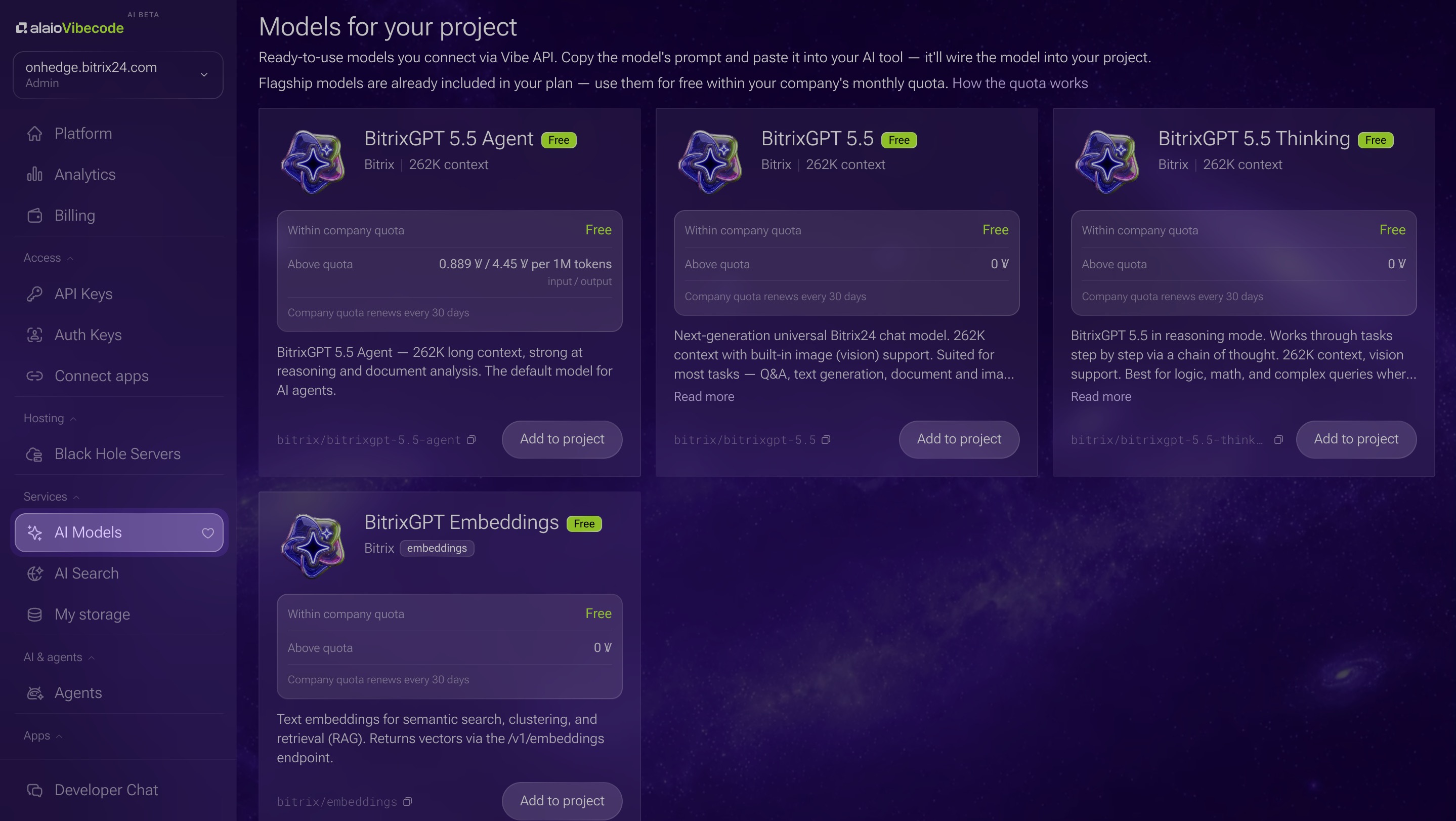
On the AI models page, you can see the list of models, their purpose, context size, and pricing.
- BitrixGPT 5.5 — a general-purpose Bitrix24 chat model. It works well for most tasks, including answering questions, generating text, analyzing data, and working with images.
- BitrixGPT 5.5 Thinking — a model with reasoning mode. It works well for tasks that require step-by-step analysis, data comparison, or complex conclusions.
- BitrixGPT 5.5 Agent — a model with a large context window. It works well for long documents, complex requests, and tasks with large amounts of data.
- BitrixGPT Embeddings — a model that works well for long text embeddings for semantic search, clustering, and retrieval (RAG).
Select and connect a model
Choose a model based on what your app needs to do. For most text-based scenarios, a general-purpose model is enough. It can prepare replies, create summaries, classify inquiries, or explain data.
For more complex tasks, use a model with reasoning mode. These models are helpful when you need to compare multiple conditions, work through long context, or prepare a detailed conclusion.
For long documents, use a model with a large context window. For audio, use a speech recognition model. It converts call recordings, meetings, and voice messages into text.
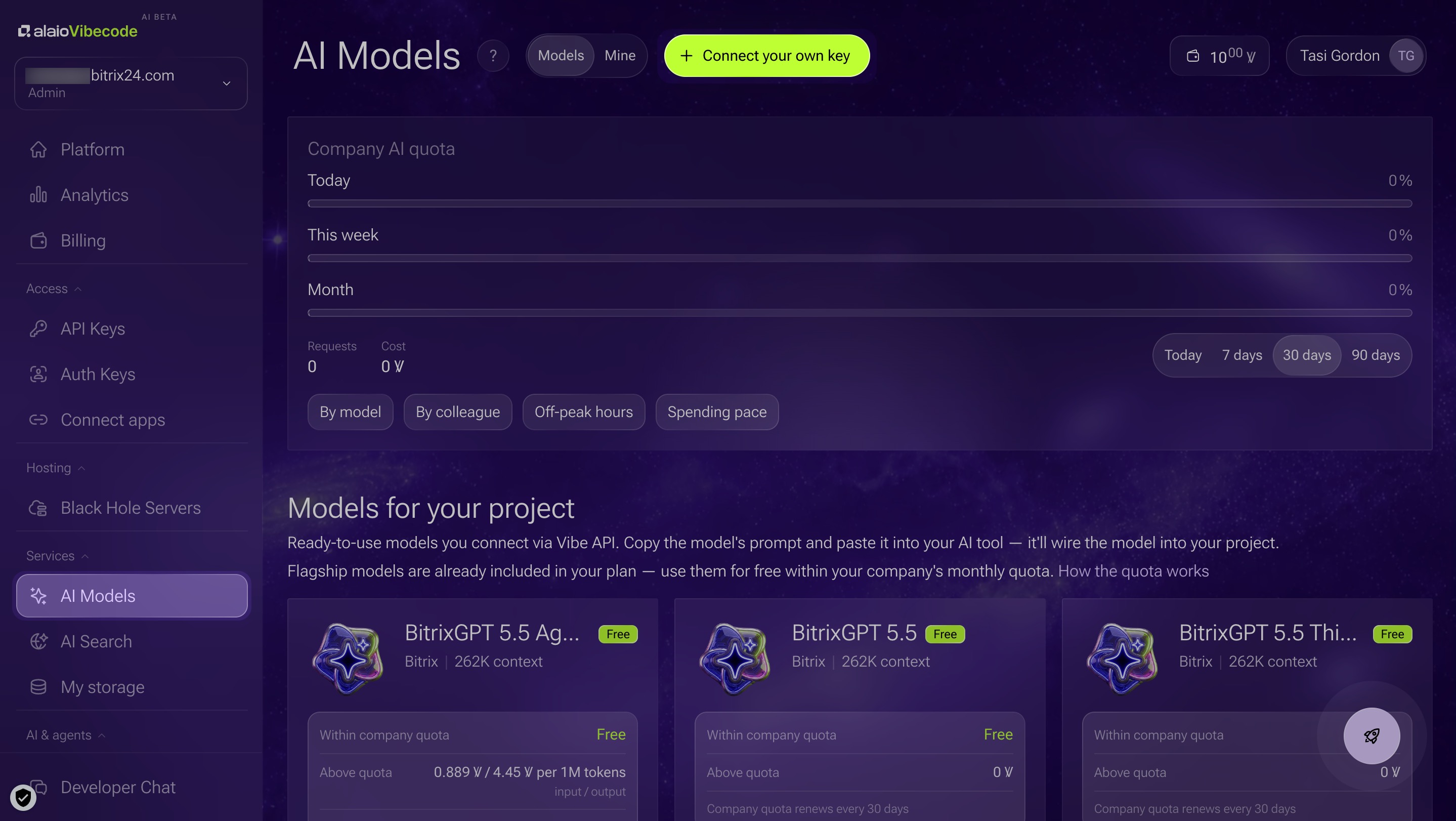
1. Open Alaio Vibecode > AI models. Review the available models, their purpose, context size, pricing, and capabilities such as image processing, audio support, or reasoning mode.
2. Click Add to project.
3. Copy the prompt, add your API key to it, and paste it into a conversation with an AI agent, such as Codex. The AI agent will add the model to the app automatically.
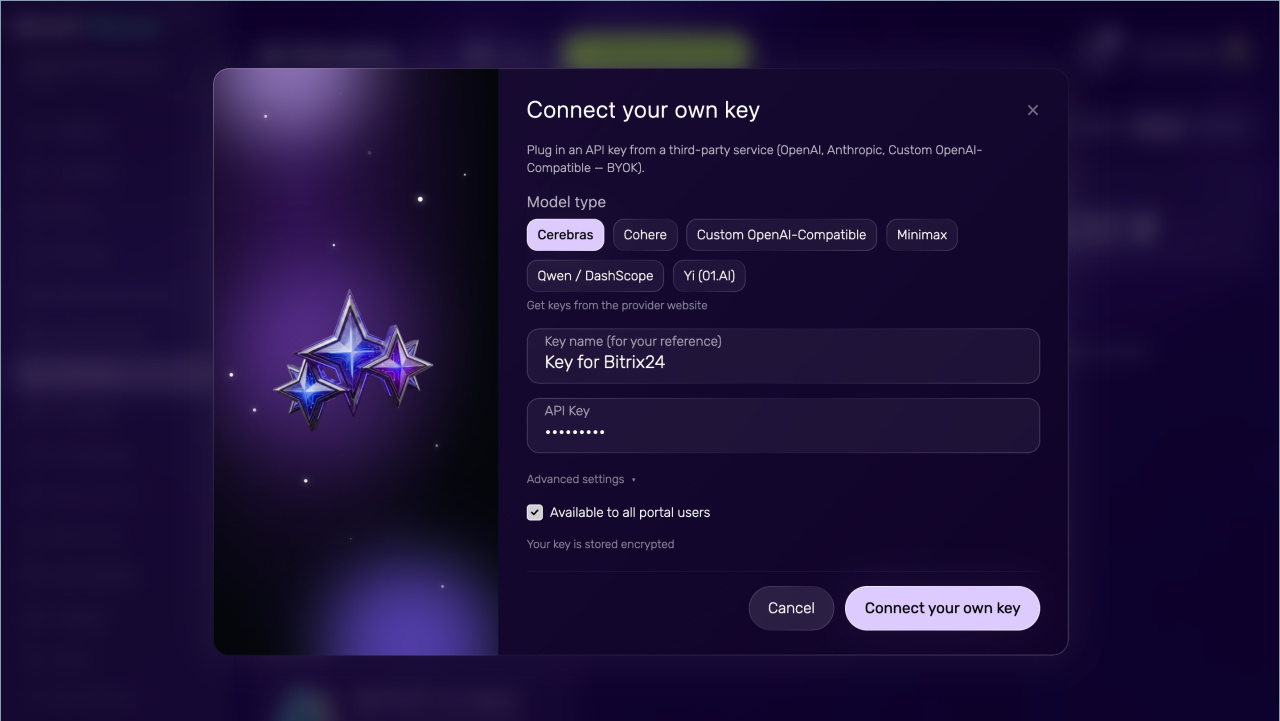
You can also connect an external AI provider with your own API key. To do this, register with the provider you want to use, such as OpenAI or Anthropic, and get an API key.
1. Open the AI models section in Alaio Vibecode.
2. Click Add key.
3. Select the provider.
4. Enter a name for the key.
5. Paste the API key.
6. Click Connect your own key.
AI model pricing
Pricing depends on the model you choose. Each model form shows whether the model is free or paid. For paid models, the form shows the cost per token. Tokens are units used to measure the amount of text in a request and response.
For example, a short request with a short reply uses fewer tokens than a long document analysis or a detailed summary across many deals. If you use an external AI service with your own key, pricing depends on that provider. Check usage costs in your provider account.
Usage considerations
AI models can make mistakes. For client replies, legal wording, and financial decisions, it is best to have an employee review the output.
Response quality depends on the request. The more precisely the app describes the task and provides context, the more useful the response will be.
Do not send unnecessary data. If the model only needs the inquiry text, there is no need to send the entire client record.
Check access permissions. The app should only work with the data it needs for its task.
Monitor usage costs. The more requests you send and the longer the texts, the higher the cost for paid models and external providers.
In brief
- AI models help Alaio Vibecode apps analyze text, prepare replies, create summaries, classify tasks, and work with documents.
- In Alaio Vibecode, you can use built-in models or connect an external model with your own API key.
- Built-in models are available right away. External models are a good option if your company already has a provider key or needs a specific AI service.
- Pricing depends on the model you choose. Each model card shows whether the model is free or paid. For paid models, the form shows the cost per token.
- AI models can make mistakes. For client replies, legal wording, and financial decisions, it is best to have an employee review the output.