
A dataset contains information about leads, deals, companies, and other Bitrix24 items. Each item has several datasets that automatically receive data from system and custom fields. Use datasets to build charts and analyze business metrics.
In this article, you'll learn about datasets for CRM details and addresses, how to join them, and how to create charts.
Datasets:
- crm_requisite — CRM company details
- crm_requisite_uf — custom fields for CRM details
- crm_bank_detail — CRM banking details
- crm_requisite_preset — CRM templates for contact or company details
- crm_address — CRM addresses
Examples:
Choose a dataset
To analyze information in a dashboard, choose a suitable dataset and create a chart.
crm_requisite — CRM company details. This dataset contains data from system fields for CRM details, including company names, legal information, registration numbers, and contact information. Use it to check which companies and contacts have a Taxpayer ID and other details filled in.
crm_requisite
| Field | Description | Data type |
|---|---|---|
| ID | Company details ID | Number |
| ENTITY_TYPE_ID | CRM item type ID | Number |
| ENTITY_ID | CRM item ID | Number |
| PRESET_ID | Details template ID | Number |
| DATE_CREATE | Date and time the company details were created | Date and time |
| DATE_MODIFY | Date and time the company details were last modified | Date and time |
| CREATED_BY_ID | ID of the employee who created the company details | Number |
| MODIFY_BY_ID | ID of the employee who modified the company details | Number |
| NAME | Details name | String |
| CODE | Details code | String |
| XML_ID | External details ID | String |
| ORIGINATOR_ID | External system ID | String |
| ACTIVE |
Shows whether the company details are active: Y — yes, N — no
|
String |
| ADDRESS_ONLY |
Shows whether the company details contain only an address: Y — yes, N — no
|
String |
| SORT | Sort order | Number |
| RQ_NAME | Full name of the person listed in the company details | String |
| RQ_FIRST_NAME | First name of the person listed in the company details | String |
| RQ_LAST_NAME | Last name of the person listed in the company details | String |
| RQ_SECOND_NAME | Middle name of the person listed in the company details | String |
| RQ_COMPANY_ID | Company registry ID | String |
| RQ_COMPANY_NAME | Company name | String |
| RQ_COMPANY_FULL_NAME | Full company name | String |
| RQ_COMPANY_REG_DATE | Company registration date | String |
| RQ_DIRECTOR | Full name of the organization's director | String |
| RQ_ACCOUNTANT | Full name of the organization's chief accountant | String |
| RQ_CEO_NAME | CEO's full name | String |
| RQ_CEO_WORK_POS | CEO's position | String |
| RQ_CONTACT | Contact person | String |
| RQ_EMAIL | Email address | String |
| RQ_PHONE | Phone number | String |
| RQ_FAX | Fax number | String |
| RQ_IDENT_DOC | Identity document | String |
| RQ_IDENT_DOC_SER | Document series | String |
| RQ_IDENT_DOC_NUM | Document number | String |
| RQ_IDENT_DOC_PERS_NUM | Personal document number | String |
| RQ_IDENT_DOC_DATE | Document issue date | String |
| RQ_IDENT_DOC_ISSUED_BY | Issuing authority | String |
| RQ_IDENT_DOC_DEP_CODE | Issuing authority code | String |
| RQ_INN | Taxpayer ID | String |
| RQ_KPP | Tax registration reason code (KPP) | String |
| RQ_USRLE | Taxpayer number (UNP) | String |
| RQ_IFNS | Tax office | String |
| RQ_OGRN | Primary state registration number | String |
| RQ_OGRNIP | Sole proprietor registration number | String |
| RQ_OKPO | Business registry code (OKPO) | String |
| RQ_OKTMO | Municipality code (OKTMO) | String |
| RQ_OKVED | Economic activity code (OKVED) | String |
| RQ_KBE | Beneficiary code (KBE) | String |
| RQ_IIN | Individual identification number (IIN) | String |
| RQ_BIN | Business identification number (BIN) | String |
| RQ_ST_CERT_SER | Registration certificate series | String |
| RQ_ST_CERT_NUM | Registration certificate number | String |
| RQ_ST_CERT_DATE | Registration certificate date | String |
| RQ_VAT_PAYER |
Shows whether the company pays VAT: Y — yes, N — no
|
String |
| RQ_VAT_ID | VAT number | String |
| RQ_VAT_CERT_SER | VAT certificate series | String |
| RQ_VAT_CERT_NUM | VAT certificate number | String |
| RQ_VAT_CERT_DATE | VAT certificate date | String |
| RQ_RESIDENCE_COUNTRY | Country of residence | String |
| RQ_BASE_DOC | Supporting document | String |
| RQ_REGON | Polish REGON number | String |
| RQ_KRS | Polish KRS number | String |
| RQ_PESEL | Polish PESEL number | String |
| RQ_LEGAL_FORM | Legal form | String |
| RQ_SIRET | French SIRET number | String |
| RQ_SIREN | French SIREN number | String |
| RQ_CAPITAL | Share capital | String |
| RQ_RCS | French RCS registration number | String |
| RQ_CNPJ | Brazilian CNPJ number | String |
| RQ_STATE_REG | Brazilian state registration number | String |
| RQ_MNPL_REG | Brazilian municipal registration number | String |
| RQ_CPF | Brazilian CPF identification number | String |
| RQ_IDENT_TYPE | Identity document type | String |
| RQ_TAX_REGIME | Tax regime | String |
| RQ_SIGNATURE | Signature file ID | Number |
| RQ_STAMP | Stamp file ID | Number |
crm_requisite_uf — custom fields for company details. This dataset contains data from custom fields added to CRM details. Use it to include additional information in your dashboards.
crm_requisite_uf
| Field | Description | Data type |
|---|---|---|
| REQUISITE_ID | Company details ID | Number |
| DATE_CREATE | Date and time the company details were created | Date and time |
UF_CRM_"field number"
|
Value of the custom field with the specified number, such as UF_CRM_123456789
|
Depends on the field type |
crm_bank_detail — CRM banking details. This dataset contains data from system fields for bank details, including bank names, account numbers, bank codes, and currencies. Use it to check which CRM details have bank account information filled in.
crm_bank_detail
| Field | Description | Data type |
|---|---|---|
| ID | Banking details ID | Number |
| ENTITY_TYPE_ID | Owner type ID | Number |
| ENTITY_ID | Details ID | Number |
| COUNTRY_ID | Country ID | Number |
| DATE_CREATE | Date and time the banking details were created | Date and time |
| DATE_MODIFY | Date and time the bank details were last modified | Date and time |
| CREATED_BY_ID | ID of the employee who created the bank details | Number |
| MODIFY_BY_ID | ID of the employee who last modified the bank details | Number |
| NAME | Banking details name | String |
| CODE | Banking details code | String |
| XML_ID | External banking details ID | String |
| ORIGINATOR_ID | External system ID | String |
| ACTIVE |
Shows whether the banking details are active: Y — yes, N — no
|
String |
| SORT | Sort order | Number |
| RQ_BANK_NAME | Bank name | String |
| RQ_BANK_CODE | Bank code | String |
| RQ_BANK_ADDR | Bank address | String |
| RQ_BANK_ROUTE_NUM | US bank routing number | String |
| RQ_BIK | Bank identification code (BIK) | String |
| RQ_MFO | Bank identification code (MFO) | String |
| RQ_ACC_NAME | Account holder | String |
| RQ_ACC_NUM | Bank account number | String |
| RQ_ACC_TYPE | Account type | String |
| RQ_IIK | Bank account number in Kazakhstan | String |
| RQ_ACC_CURRENCY | Account currency | String |
| RQ_COR_ACC_NUM | Correspondent account number | String |
| RQ_IBAN | International bank account number (IBAN) | String |
| RQ_SWIFT | SWIFT code | String |
| RQ_BIC | Bank identifier code (BIC) | String |
| RQ_CODEB | French bank code | String |
| RQ_CODEG | French bank branch code | String |
| RQ_RIB | French RIB check key | String |
| RQ_AGENCY_NAME | Bank branch name | String |
| COMMENTS | Comment | String |
crm_requisite_preset — CRM templates for contact or company details. This dataset contains information about CRM details templates, including names, countries, field settings, and statuses. Use it to view CRM details template settings for different countries.
crm_requisite_preset
| Field | Description | Data type |
|---|---|---|
| ID | Details template ID | Number |
| ENTITY_TYPE_ID | CRM item type ID | Number |
| COUNTRY_ID | Country ID | Number |
| DATE_CREATE | Date and time the template was created | Date and time |
| DATE_MODIFY | Date and time the template was last modified | Date and time |
| CREATED_BY_ID | ID of the employee who created the template | Number |
| MODIFY_BY_ID | ID of the employee who modified the template | Number |
| NAME | Template name | String |
| XML_ID | External template ID | String |
| ACTIVE |
Shows whether the template is active: Y — yes, N — no
|
String |
| SORT | Sort order | Number |
| SETTINGS | Field settings in JSON format | String |
crm_address — CRM item addresses. This dataset contains addresses for companies, contacts, leads, and CRM details. It includes address types, associated CRM items, countries, cities, and other address information. Use it to view and analyze CRM item addresses, including cities and postal codes.
crm_address
| Field | Description | Data type |
|---|---|---|
| ID | Address ID | Number |
| TYPE_ID | Address type ID | Number |
| TYPE_NAME | Address type name | String |
| TYPE | Address type in the format "[code] name" | String |
| ENTITY_TYPE_ID | ID of the item type that stores the address | Number |
| ENTITY_ID | ID of the item that stores the address | Number |
| ANCHOR_TYPE_ID | ID of the CRM item type associated with the address | Number |
| ANCHOR_ID | ID of the CRM item associated with the address | Number |
| ADDRESS_1 | Address, line 1 | String |
| ADDRESS_2 | Address, line 2 | String |
| CITY | City | String |
| POSTAL_CODE | Postal code | String |
| REGION | District | String |
| PROVINCE | State or province | String |
| COUNTRY | Country | String |
| COUNTRY_CODE | Country code | String |
| IS_DEF |
Shows whether the address appears in compatible contact or company fields: 1 — yes, 0 — no
|
Number |
Create a chart
Use datasets to create charts and visualize your data.
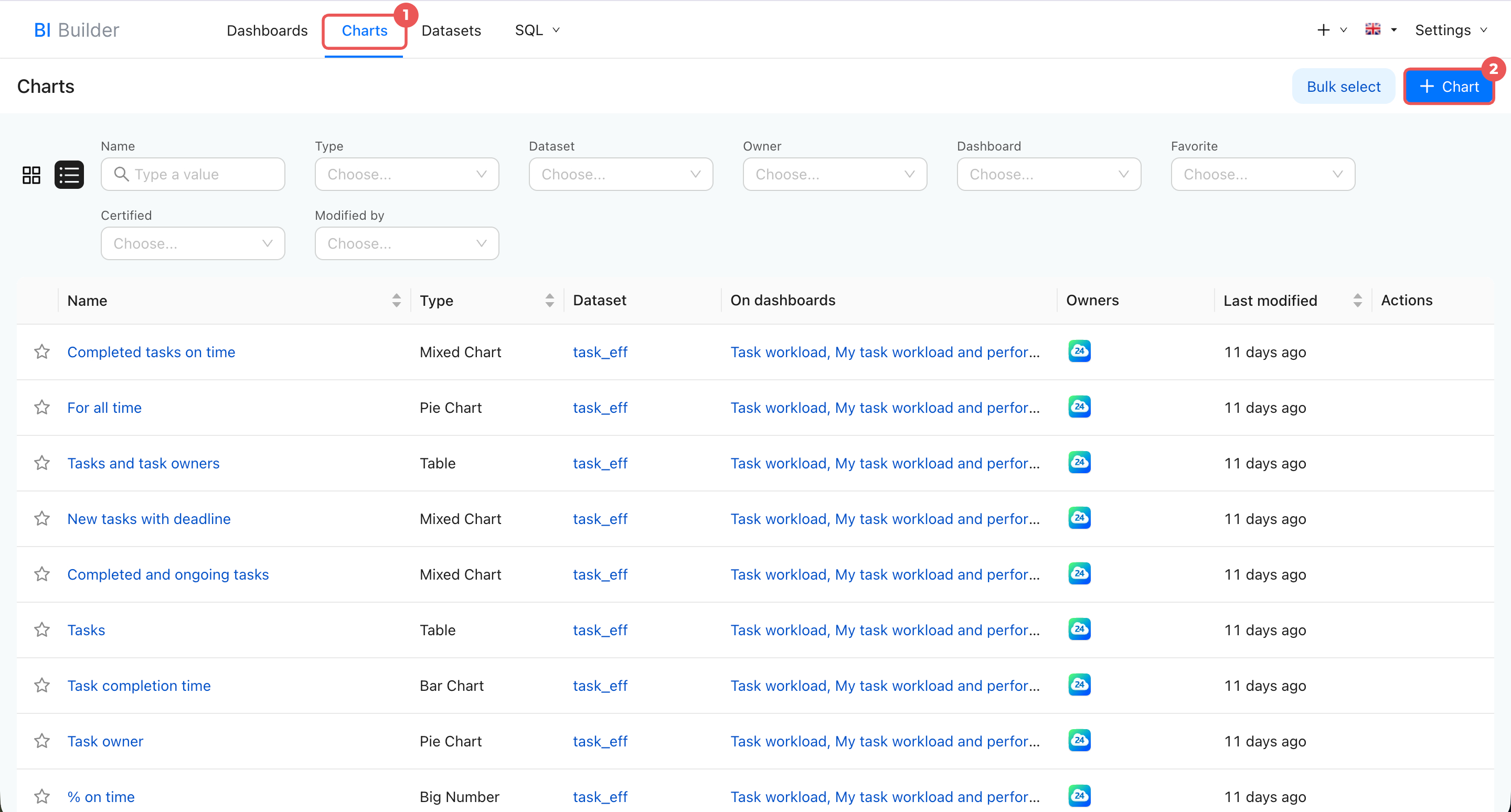
- Open BI Builder > Charts.
- Click + Chart in the top-right corner.
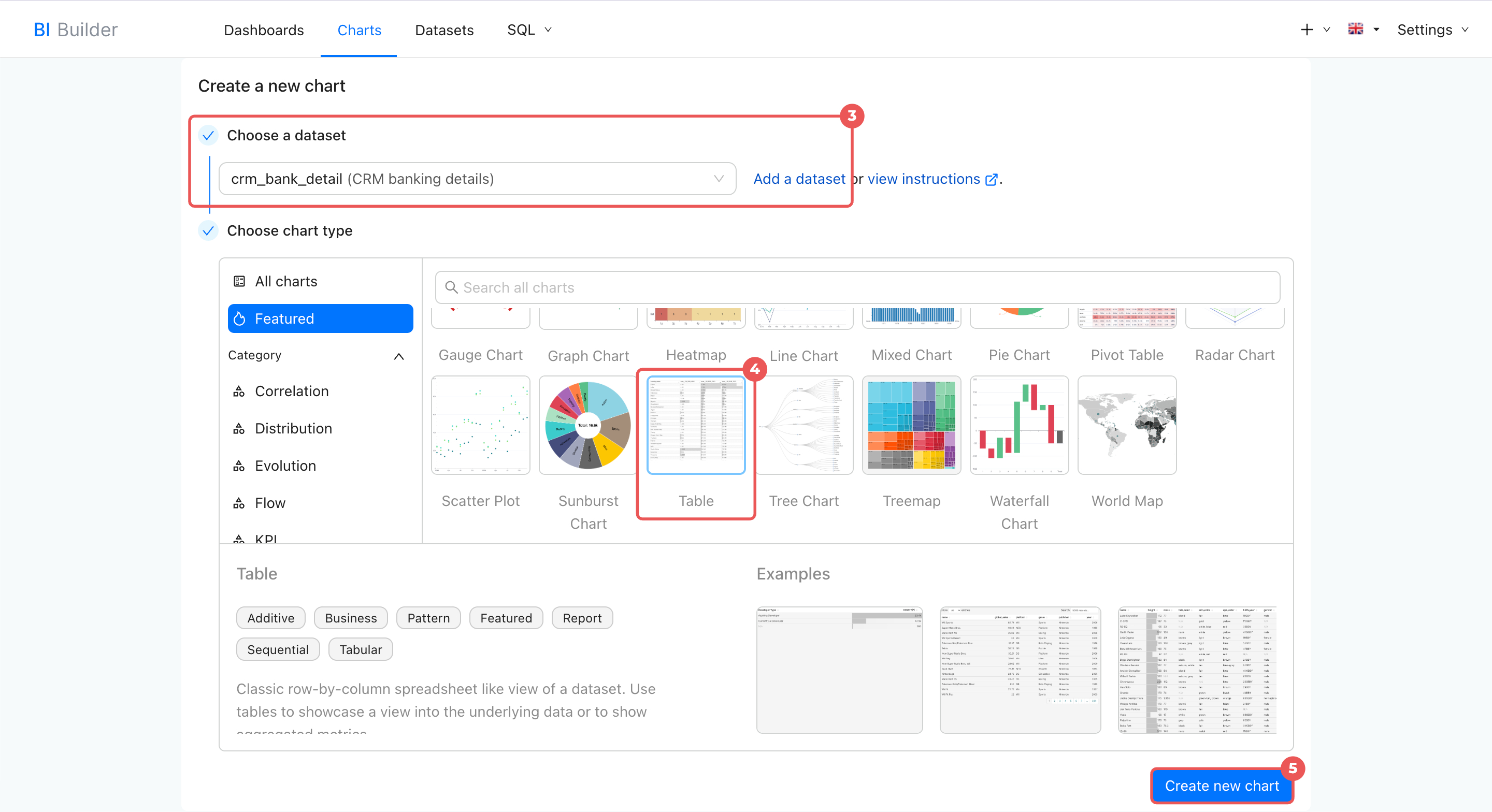
- Choose a dataset from the list. If you do not see the dataset you need, click Add a dataset.
Create a dataset - Select a chart type, such as a graph, table, card, or another option.
- Click Create new chart.
Merge datasets
Merge datasets to include bank details for companies and contacts in your dashboards.
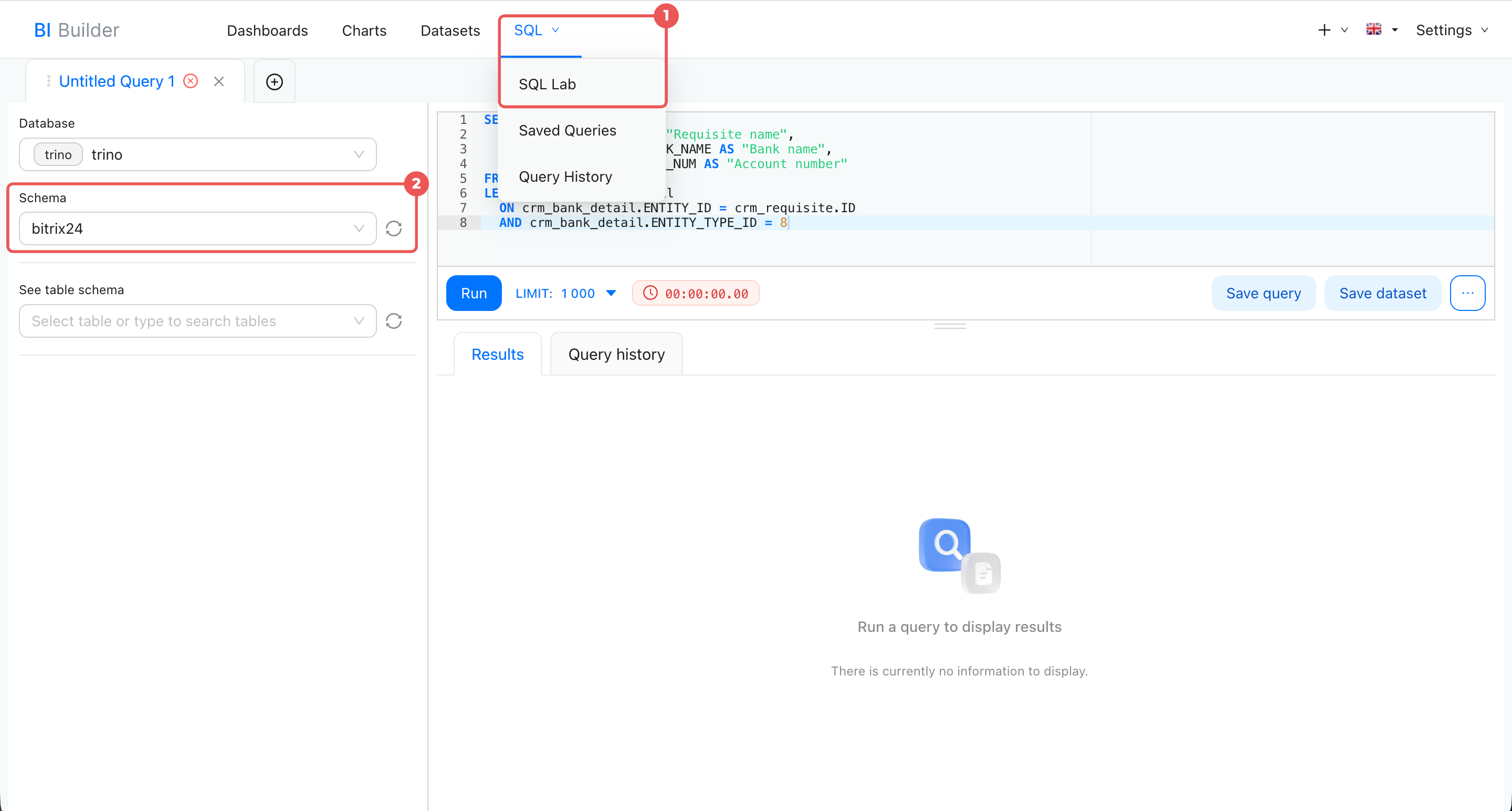
- Open BI Builder > SQL > SQL Lab.
- Make sure
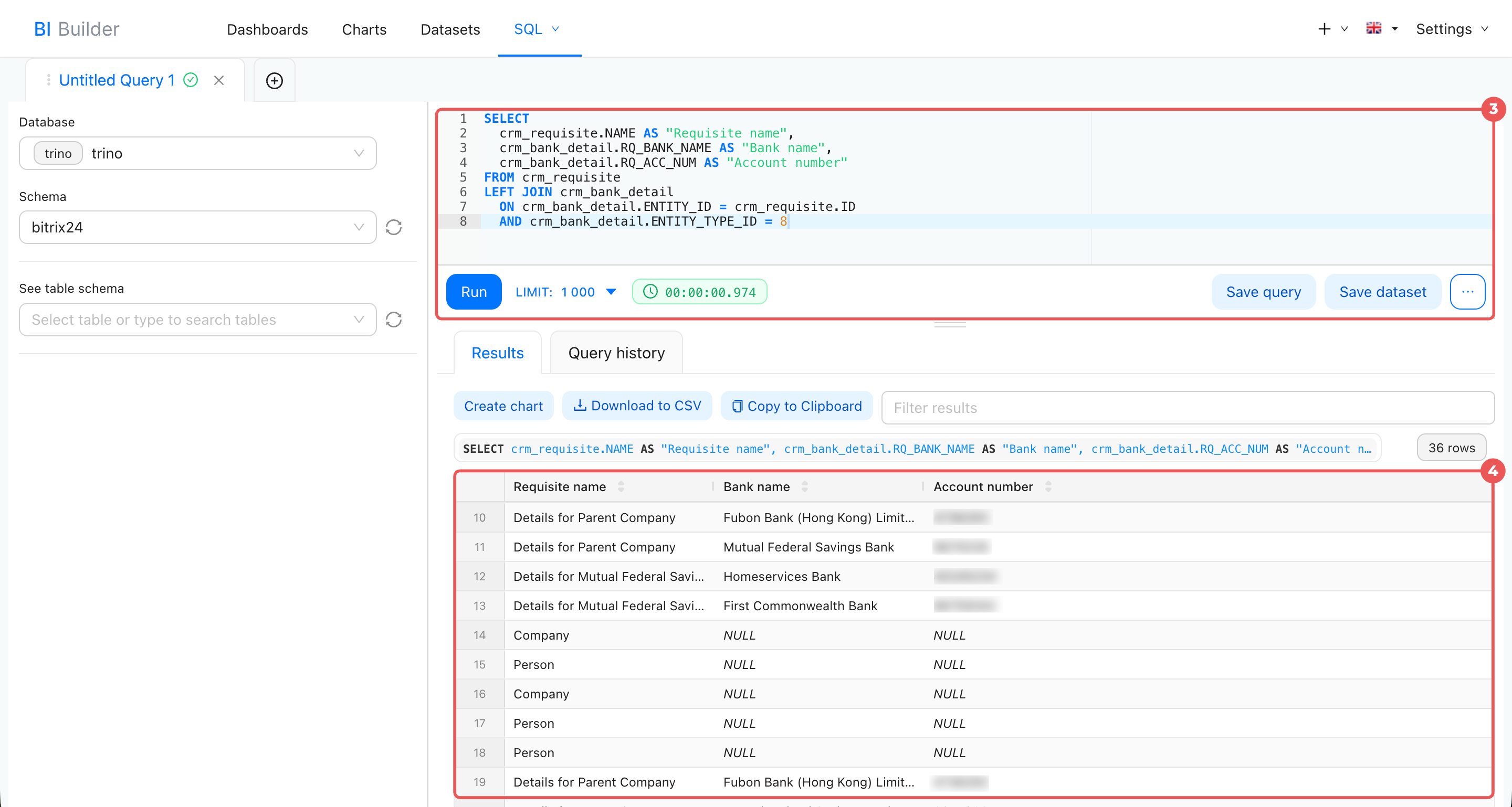
bitrix24is selected in the Schema field. - Enter the SQL query and click Run.
- Review the query results. To use them in a chart, save the query as a dataset.
Create a chart from a virtual dataset
If this is your first time merging datasets, see the sample query.
Example SQL query
This query combines two datasets: CRM company details (crm_requisite) and CRM banking details (crm_bank_detail). It returns the details name, bank name, and account number.
SELECT
 crm_requisite.NAME AS "Details name",
 crm_bank_detail.RQ_BANK_NAME AS "Bank name",
 crm_bank_detail.RQ_ACC_NUM AS "Account number"
FROM crm_requisite
LEFT JOIN crm_bank_detail
 ON crm_bank_detail.ENTITY_ID = crm_requisite.ID
 AND crm_bank_detail.ENTITY_TYPE_ID = 8
In this query:
SELECTspecifies which fields to display: details name, bank name, and account number.FROMsetscrm_requisiteas the main dataset.LEFT JOINadds banking details fromcrm_bank_detail. CRM details remain in the results even if no bank information is available.ONmatches banking details to CRM details by ID. The value8inENTITY_TYPE_IDidentifies CRM details.
In brief
- Datasets contain information about leads, deals, companies, and other Bitrix24 items.
- Each CRM item can have multiple datasets. They automatically receive data from system and custom fields.
- Datasets for CRM details and addresses: CRM company details (crm_requisite), custom fields for CRM details (crm_requisite_uf), CRM banking details (crm_bank_detail), CRM templates for contact or company details (crm_requisite_preset), and CRM addresses (crm_address).
- Use datasets to create charts and analyze business data. For example, check which CRM items have their details, bank information, and addresses filled in.
- Merge datasets to view bank details for companies and contacts. Write an SQL query, save it as a dataset, and create a chart.